
STOP TYPING. START PACING.
I'm about to take the pain out of AI filmmaking.

I have a confession.
I don’t think AI filmmaking is any fun at all.
The rendering. The consistency problems. The rejected prompts. And the typing. So much typing.
The long, tedious, copy-paste-from-another-document, JSON-prompt-as-long-as-your-arm, “wait, why is this supposed to be fun again?” typing.
Character descriptions. Scene setups. Style references. Visual tone. All of it, hammered into a text field over and over again. Like it’s 1994 and you’re writing a term paper.
Or it’s 1980 and you’re Jack Torrance.
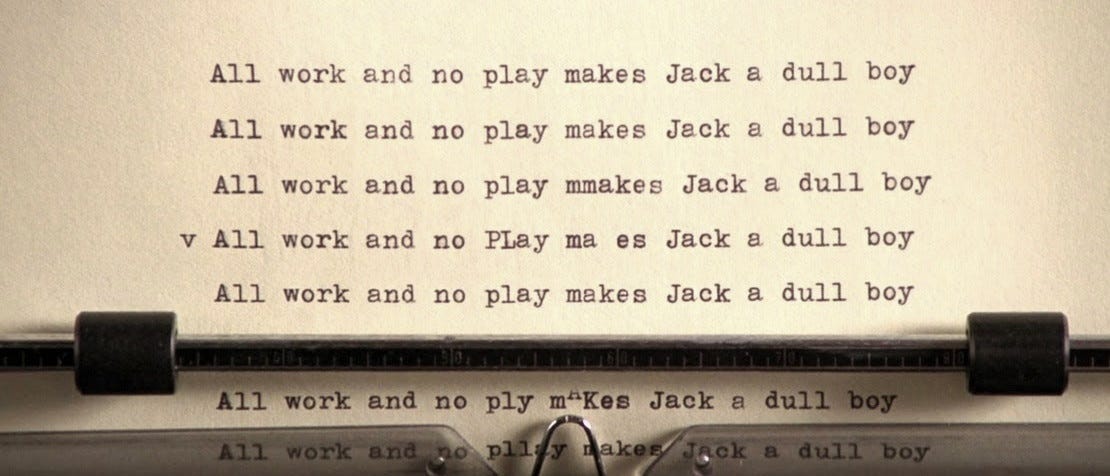
I kept thinking: this is not how creative people work. This is not how ideas actually move through a brain. Writing the perfect line of description in a screenplay is satisfying. Typing it over and over again in a form field is death.
As Truman Capote once said about Jack Kerouac’s work, “That’s not writing, that’s typing.”
A few weeks ago, a colleague pointed me to a workflow that fixed all of that.
It’s not revolutionary. It’s not some secret technique I invented. I didn’t write a line of code. I’m not “vibe coding,” whatever that means. (Okay, I know what it means. Still not doing it.)
It’s embarrassingly simple. And it’s made my creative process faster, more productive, and, crucially, genuinely fun again.
I’m going to walk you through the whole process I’ve been using from initial back-of-the-napkin ideation, to show Bible creation, prompt crafting, and beyond. The idea throughout is to use AI tools as a force-multiplier for your creativity – never, ever as a replacement.
Here’s how it works.
STEP ONE: STOP TYPING. START TALKING.
A few weeks back I discovered an app called Wispr Flow.
[I swear to God this isn’t a sponsored post… but it’s sure about to sound like one. Wispr hasn’t given me anything. I just love this tool and want you to use it. There’s an offer code at the bottom for a free month.]
Wispr is basically a transcription tool, but that description undersells it. Think of it less like dictation and more like a very patient assistant who follows you around, writes down everything you say, cleans it up, and hands it back in a form that’s actually readable. Actually makes sense. Actually organized.

Ever wanted to act like a brilliant novelist, pacing around the living room dictating ideas into a micro cassette recorder? Ever tried that? I have. It feels cool for about 5 seconds. Then you realize your train of thought is about as easy to follow as the plot of Tenet.
Wispr changes that because it corrects your work on the fly. You can tell it:
“My character has blue skin and long hair... actually, scratch that, green skin. Or should it be pink? Boy I dunno, I mean pink will look good against the background I was talking about 12 minutes ago, but no. No let’s go with blue skin, pink hair, and a buzz cut. Oh and that background is probably just gray after all.”
Wispr goes back, fixes it, and keeps going. No rewinding. No retyping. Just thinking out loud, the way creative people actually think.
So now, instead of staring at a blank word doc, you can walk laps around the Silver Lake Reservoir and talk into your phone like the guy nobody at the dog park is making eye contact with. You just... riff.
Stream of consciousness. Train of thought. The messy, chaotic, one-idea-bumping-into-the-next way that ideas actually come.

Then Wispr cleans it up. Then you drop it into Claude.
Then the real fun starts.
STEP TWO: LET CLAUDE ASK THE QUESTIONS.
This is where Claude comes in. Opus 4.7 is a bonafide credit hog, but it’s worth every token.
Once I’ve dumped my brain into a document via Wispr, I bring it to Claude and tell it (him?!) that we’re writing the bible for a TV series. But first, I want it (HIM?!?!) to ask me questions.
Just read what I’ve input, figure out what’s missing or underdeveloped or contradictory, and ask me about it. Clarify my thoughts. Expose inconsistencies. Point out opportunities. Shine a light on problems, cliches, mistakes. Make me question and explain myself.
Last week I spent a couple hours brain-dumping a new project. Claude came back with about 20 questions. Some I could answer immediately. Some were irrelevant, because Claude is just a machine. But others I sat with for a day because they were questions worth answering, and worth answering well. All of the questions were, in their own way, useful.
Then I spent another hour or two answering those questions, out loud, via Wispr, walking around the reservoir again, and fed the answers back to Claude. Rinse and repeat. All while getting my steps in. This did not feel like a typing session. This felt like a proper brainstorm.
And after all of this, it’s time for Claude to write the Bible. You haven’t typed a single word, and you’re not about to start now. Why would you? The typing is the part that sucks… and dammit, you deserve better.
Claude will spit out twenty, twenty-five, thirty pages of detailed, expansive creative documentation in highly structured outline format. Your characters’ histories. Where they start in episode 1. Where you think they might possibly be going in season 5. The look of the filmmaking. The tone. The editing style. The music. The feeling you’re trying to create. Everything that’s been living in your head, finally on paper. Consummately readable, whether your reader is a bot or a human collaborator.
And here’s the thing I want to be really clear about.
Neither Claude nor Wispr is writing your Bible. Wispr is organizing it. Claude is the writers’ room assistant who keeps the whiteboard legible. And Claude is the writing partner who asks useful questions while you pace and pontificate and get to feel generally impressed with yourself. As you should be, because the ideas are yours. The vision is yours. The AI tools are just doing the least fun part, so you can focus on the most fun part.
Could you type all of this up yourself? Sure. It’ll take ten times as long and be about 2 percent as fun. Your call.
STEP THREE: NEVER WRITE A PROMPT AGAIN.
(Okay, almost never.)
This is where the workflow really pays off. And it’s where I think it solves the single biggest barrier to entry in AI filmmaking.
When it’s time to actually generate character sheets, stills, video, the old way is brutal. You’re copying style references from one document, pasting character descriptions from another, hand-crafting JSON prompts longer than some screenplays. It’s grunt work. It kills the creative momentum right when you need it most.
The new way: you just talk to Claude.

Describe your scene. Where it fits in the story. Who’s in it. What the shots are. What you’re going for emotionally. Claude already knows everything about your project, it’s been living inside your Bible. It knows your character’s blue skin and pink hair (or was it green skin and a buzz cut?) and the visual language of your entire world. It knows the what. And more importantly it knows your why. For everything.
So it writes the prompts. The long ones. The JSON ones. The ones that suck all the fun out of the room.
And when it nails a prompt, you let it know. The color grade that you described, finally rendered in 4k glory by NanoBanana? Upload that frame to Claude and tell it: yes that. That was the prompt that worked for this scene. Remember that… so I don’t have to. Or: hey, here’s what your prompt did wrong. Fix it.
Claude handles it while you go back to thinking about story, rather than trying to remember what word doc you pasted that one JSON color prompt into.
That’s the whole workflow. Brain dump via Wispr. Writer’s room assistant via Claude. Bible via Claude. Prompts via Claude. Feedback loop to Claude so it continues to learn what good means to you, for this particular project.
You, meanwhile, get to be the director.
I’m currently using this process on a few very different projects. One is for a production company and a major studio streamer I’m not allowed to name yet. And one is my own project, which I’m keeping under wraps a little longer but am very excited to tell you about soon.
Both are running through the same workflow. Both have benefited from it in ways I didn’t expect.
The biggest surprise has been how much more I enjoy the process now. AI filmmaking has a reputation for being technically demanding and creatively draining. All tools, no soul.
This workflow flips that. The tools do the draining parts. You do the soul parts.
That’s how the future was always supposed to work.
Here’s the Wispr Flow offer code for a free month. Full disclosure: if you dictate 2,000 words then I get a free month, too. That’s not why I’m writing this post… but it doesn’t hurt.
Try the workflow. Pace around your living room. Talk into your phone like you’re dictating a manifesto. Make your neighbors nervous.
Then go make something impossible.
Great! Love! Nice Capote call out! I have a few diction-y apps and shortcuts - I played with Speakly from Genspark & will check out Whisprflow... and get you your month... Agree talking is a step up... still doesn't replace the energy of a room with great colleagues.
why would there be pain in the first place? I am confused